Your Google Business Profile, field by field.
Your Google Business Profile is what people see when they find you on Google Search and Maps. It's free, and it's the thing Google uses to decide if you show up in the Map Pack. Here's each part of it, what to put there, and what to avoid.
Before you start.
Go to google.com/business and sign in with a Google account you'll keep. If you can, use one the business owns, not an employee's or a past web designer's. If you're not sure whether you already have a profile, search your business name on Google Maps first. Making a second one is against the rules.
Google will ask you to verify the business, often with a short video showing your work, tools or shop. Until you're verified, your profile is less likely to show up.
The fields, one at a time.
Here's where the main parts of a profile show up when someone finds you. Each number matches the list beside it.
- Business name
- Reviews and star rating
- Main category
- Hours
- Call, website, directions and booking buttons
- Address or service area
- Description
- Services
- Photos
- Posts
A drawing of a profile, not a real business. Google's layout changes from time to time, but the parts stay the same.
And here's how two of those parts look in a real search:
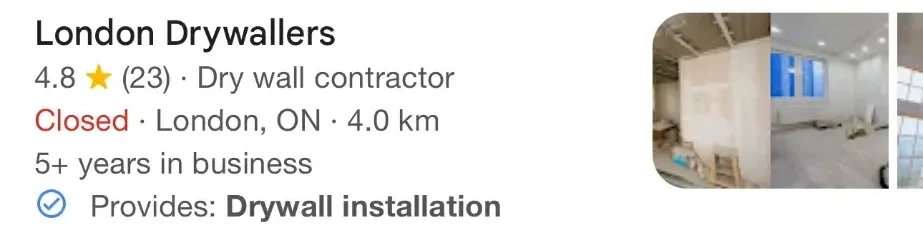
- The main category shows beside the rating, in every search result.
- "Provides" is pulled from the services on the profile, matched to the search.
From a real Google search for "drywall contractor" in London, Ontario, September 2026. The category and a service from the profile show right under the name.
- Business name
Your real name, exactly as it's on your sign, truck or invoices.
Common mistake: Adding services or towns to the name. It's against Google's rules and a common reason profiles get suspended.
- Main category
The one most specific category for your main business. Look at what the top businesses in your area use.
Common mistake: Picking something broad like "Contractor" when "Roofing contractor" exists.
- Other categories
Only the ones that are a real part of what you do. Google says to use as few as possible.
Common mistake: Adding every loosely related category.
- Address or service area
If customers come to you, your real address. If you go to them, hide the address and list the towns you serve.
Common mistake: A virtual office or mailbox address to look local somewhere you're not.
- Hours
The hours customers can actually reach you. Add holiday hours ahead of time.
Common mistake: Leaving them out, so Google or customers guess.
- Phone
A local number that rings the business, ideally the same one on your website.
Common mistake: A number you don't answer, or a different number on every listing.
- Website
Your own website. If you have a page for that location, link to it.
Common mistake: Linking to a Facebook page, or to a link that forwards somewhere else.
- Services
Every service you want to be found for, each with a short line in plain words.
Common mistake: Skipping it. It's one of the easiest ways to tell Google what you do.
- Description
A few plain sentences: what you do, who for, where, and what makes you the safe choice. You get up to 750 characters.
Common mistake: Stuffing in keywords, or pasting links and prices.
- Photos
Real photos of your work, your team, your vehicles or shop. Add a few every month.
Common mistake: Stock photos, or nothing but a logo.
- Booking or quote link
If you take bookings or quote requests online, add the link so people can do it from the profile.
- Posts
Short updates: a recent job, a seasonal tip, an offer. They show people the business is active.
Reviews and replies.
Reviews count toward how well known Google thinks you are, and they're what people read before they call. Ask every customer, the same way, right after the job. A short text with your review link works well.
Reply to every review. Thank people by name and mention the job. For a bad one, stay calm, keep it short and offer to sort it out offline. Google says replying shows you value your customers.
- Don't pay or give discounts or gifts for reviews.
- Don't ask only the customers you think will be happy.
- Don't write reviews for yourself, or ask family or staff to.
Keep it up to date.
A profile isn't a one-time job. Once a month, take ten minutes:
- Check that your hours, phone and website are still right. Anyone can suggest edits to your profile, and Google sometimes accepts them.
- Add a few new photos.
- Reply to any new reviews.
- Post one update.
- Add any new service you offer.