What is the Google Map Pack, and how do you get in it?
Search for "plumber near me" on your phone. Before the regular results, Google shows a map with three businesses under it. That box is the Map Pack. For a lot of local searches, it's the first thing people see, and each business has a Call button right there.
What the Map Pack is.
The Map Pack (some people call it the local pack) shows up when Google thinks you want a business nearby. Searches like "roofer London Ontario", "dentist near me" or "drywall repair" all bring it up.
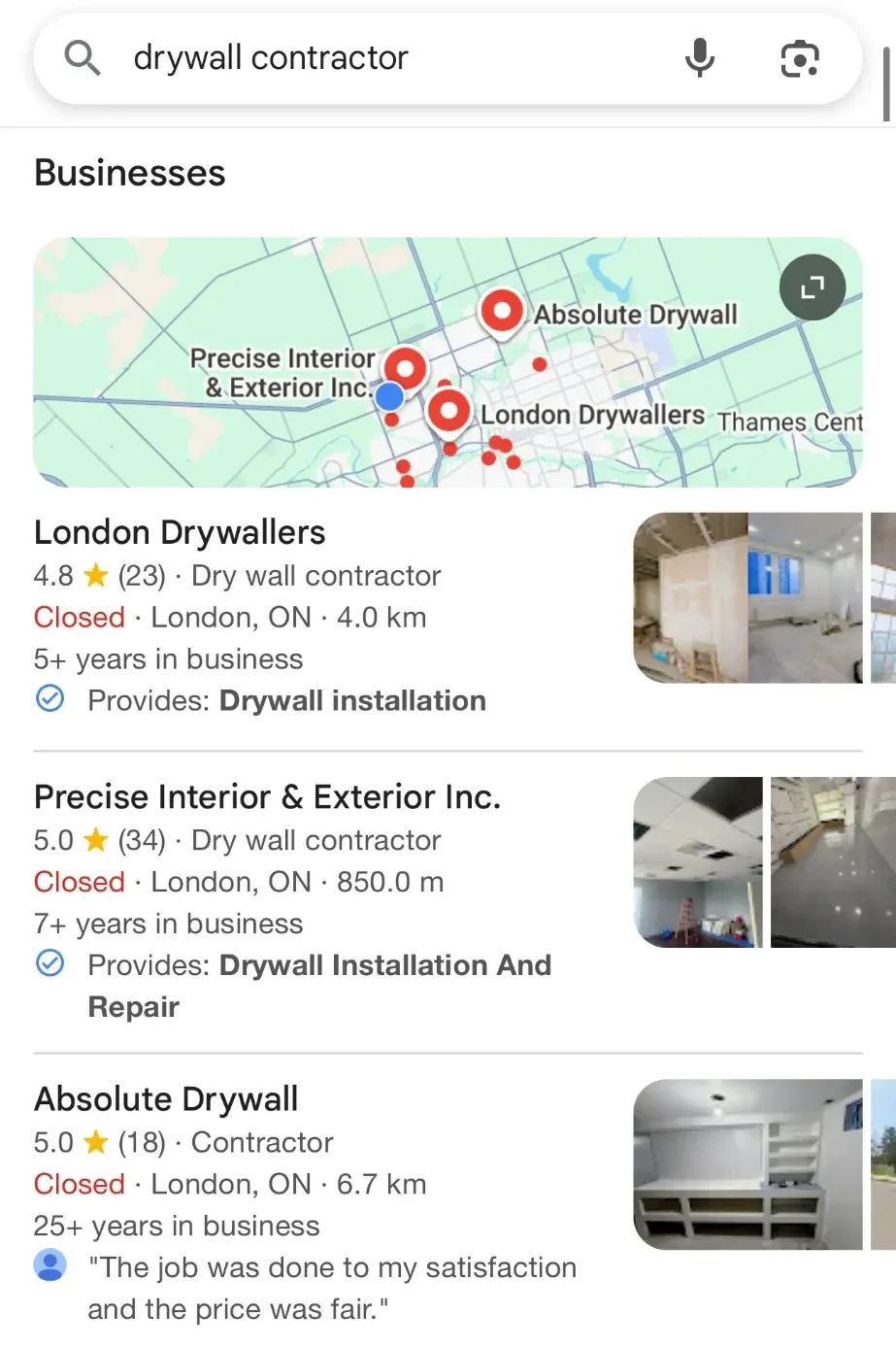
- The map and the three businesses under it: that's the Map Pack.
- First place has 23 reviews. Second place has 34. More reviews help, but they aren't everything.
- "Provides: Drywall installation" comes from the services the owner listed on the profile.
- Second place is the closest, only 850 m away. Distance counts, but it doesn't win on its own.
- Third place is 6.7 km away and its category just says "Contractor". A more specific category could help it.
A real Google search for "drywall contractor" in London, Ontario, September 2026.
Each business shows its star rating, number of reviews and category, with buttons to call, get directions or visit the website. Tap "More businesses" and you get the full list in Google Maps.
Each business in it comes from its Google Business Profile. That's the free listing you set up and manage through Google. No profile, no spot in the Map Pack.
You may also see a business marked "Sponsored" at the top. That's an ad. It's paid for and works separately from the three free spots.
How Google picks the three.
Google says local results are mainly based on three things:
- You can help
Relevance
How well your profile matches what the person searched for. A complete profile helps Google make that match.
- You can't change
Distance
How far your business is from the person searching, or from the place they typed.
- You can help
Prominence
How well known your business is. Google says reviews (how many and how good), and links from other websites, count toward this.
There's no way to request or pay for a better local ranking on Google.
So anyone who promises you a top spot is guessing. What you can do is give Google the clearest, most complete picture of your business, and give customers reasons to talk about you.
What you can change.
You can't move your shop closer to every customer. But most of relevance and prominence is in your hands.
- Verify your profile. Google says a verified business is more likely to show up in results.
- Pick the right main category. It's the single clearest signal of what you do. Choose the most specific one that fits your main business, like "Drywall contractor" rather than "Contractor".
- Fill in everything: services, service area, hours, phone, website, and a plain description of what you do and where.
- Add real photos of your work, your team and your vehicles or shop. Keep adding them.
- Ask every happy customer for a review, and reply to the reviews you get, good and bad.
- Keep your name, address and phone the same everywhere they're listed: your website, Facebook, directories.
- Have a website with a page for each main service, so Google has more to match a search to.
A 30-minute check you can do today.
Grab your phone and a notepad. Google changes results based on where you are, so a search from your own shop isn't what a customer across town sees. If you can, search from the area you want more work from, or type the town into the search.
- Search for your main service and your town, the way a customer would. Write down the three businesses in the Map Pack.
- Look at the category under each name. Is yours the same as theirs, or as specific?
- Count their reviews and yours. Note how recent their newest reviews are.
- Open your own profile. Is anything missing or wrong: hours, phone, website link, services?
- Look at their photos next to yours. Do yours show real work?
- Search for your business name. Does your profile show up, with the right details?
The gaps you find are your to-do list. The biggest one is usually reviews.
What not to do.
Some shortcuts break Google's rules. They can get your profile suspended, and getting it back is slow and never certain.
- Don't add keywords to your business name. "Smith Plumbing" is your name; "Smith Plumbing Best Emergency Plumber London" breaks the rules.
- Don't use a fake address, a virtual office or a mailbox to look closer to a town.
- If customers don't come to you, hide your street address and set a service area instead.
- Don't pay for reviews or offer discounts or gifts for them.
- Don't ask only your happiest customers to review you. Google calls that selective asking and doesn't allow it.
- Don't make a second profile for the same business.